5. Create a call flow
Heedify supports visual call flow routing via the Call Flows module, integrated with Microsoft Teams resource accounts and Teams Phone — a call flow describes what happens when a customer calls your Teams number, from the greeting to the queue to any fallback, configured through a drag-and-drop editor.
Prerequisites
- A Teams resource account with a phone number assigned
- The queue created in the previous step
Create the Teams resource account (Unify model)
In the Unify model, create and link the Teams resource account with PowerShell before building the flow in the portal. Run the commands in Teams PowerShell.
Connect:
Connect-MicrosoftTeams
Create the resource account (Unify application id 13dc7c3d-b71b-4568-a68e-ac31df943617):
New-CsOnlineApplicationInstance -UserPrincipalName "acme_desk@acme.com" -DisplayName "ACME Desk" -ApplicationId 13dc7c3d-b71b-4568-a68e-ac31df943617
In the Microsoft 365 admin center, assign a Microsoft Teams Phone Resource Account licence (free) to the new account.
Associate the ACS resource that matches your region:
| Region | AcsResourceId |
|---|---|
| Europe (EU) | 3e7944ef-8a11-4125-8f92-8ff40adf1272 |
| America (AMER) | 6bfbd5b3-013b-443f-ac56-75d75d730dd6 |
| Asia-Pacific (APAC) | 261317e9-8295-4b2f-8541-4f22e00fe879 |
Set-CsOnlineApplicationInstance -Identity "acme_desk@acme.com" -ApplicationId 13dc7c3d-b71b-4568-a68e-ac31df943617 -AcsResourceId <AcsResourceId-for-your-region>
Assign a phone number — Calling Plans:
Set-CsPhoneNumberAssignment -Identity "acme_desk@acme.com" -PhoneNumber "+33189385357" -PhoneNumberType CallingPlan
…or Direct Routing:
Set-CsPhoneNumberAssignment -Identity "acme_desk@acme.com" -PhoneNumber "+33189385357" -PhoneNumberType DirectRouting
Then build the flow below and, on the Resources tab, select the Teams Phone Extensibility option. See Call Flows for the full reference.
Steps
- Open Call Flows from the sidebar
- Click +Add and enter the aleady created Ressource Account
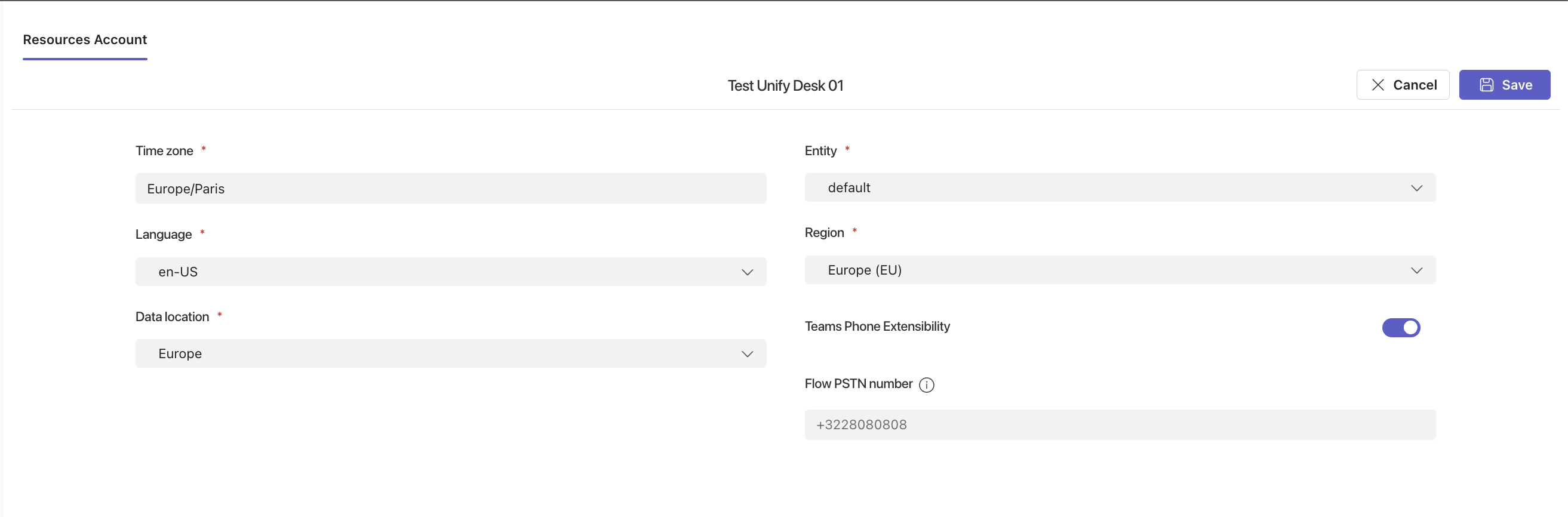
- In the Resources Account tab, fill in:
- Time zone — e.g.
Europe/Paris - Entity — select the entity that owns this flow
- Language — e.g.
en-US - Region — select the region matching your ACS resource (
Europe (EU),America (AMER)orAsia-Pacific (APAC)) - Data location — where call data is stored (e.g.
Europe) - Teams Phone Extensibility — enable for Unify model
- Flow PSTN number — the phone number assigned to the resource account (e.g.
+3228080808)
- Time zone — e.g.
- In the Greeting tab, upload or generate a welcome message
- In the Routing tab, drag a Greeting node, then a Queue node that points to your queue, then a fallback Transfer or Disconnect node
- In the Open Hours tab, configure your business hours and out-of-hours fallback
- Click Save
Minimum viable flow
Greeting → Queue → (if no answer) Disconnect
You can add IVR, variables, workflows and surveys later. See Call Flows for the full reference.
Next → 6. Verify